
Advanced Subscription Options let you customize how your subscription products behave after the initial purchase. From free trials and renewal pricing to billing limits and delivery schedules, these settings help you create subscription plans that match your business model.
Note: These options are available only for subscription products. Some features, such as Delivery Schedule, are available in the Pro version.
Advanced Subscription Settings #
After enabling Subscription for your product, navigate to:
Product Data → Subscription
Scroll down to the Advanced Subscription Options section.
The following settings are available:
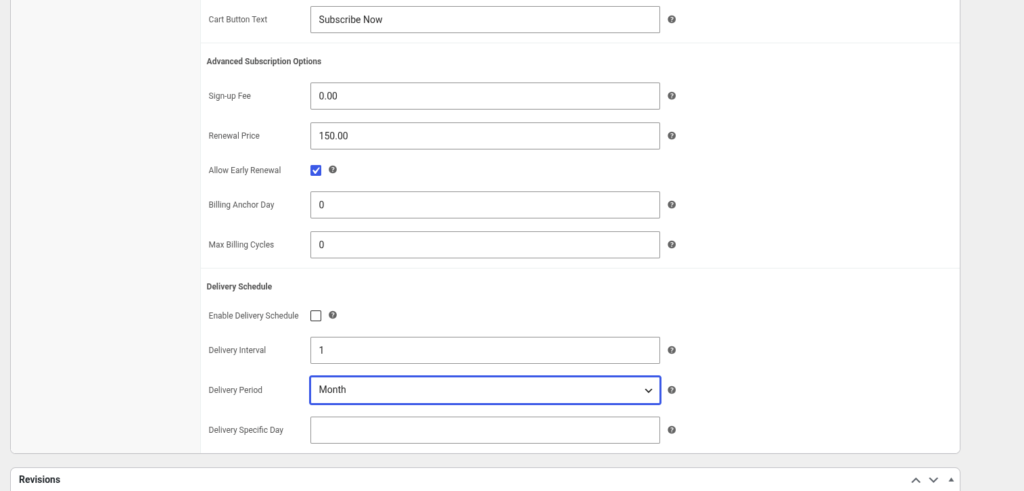
Sign-up Fee #
Charge customers a one-time fee when they subscribe.
Renewal Price #
Set a custom price for future renewals.
- Leave it equal to the product price to charge the same amount each billing cycle.
- Change it to offer discounted or increased renewal pricing.
Allow Early Renewal #
Enable this option to allow customers to renew their subscription before the scheduled renewal date.
- Gives customers more flexibility.
- Useful for prepaid or renewable membership plans.
Billing Anchor Day #
Choose a fixed day of the month for subscription renewals.
For example:
- Enter 1 to renew on the first day of every month.
- Enter 15 to renew on the fifteenth day of every month.
- Leave 0 to renew based on the customer’s purchase date.
Max Billing Cycles #
Limit how many times a subscription renews automatically.
Examples:
- 0 = Unlimited renewals.
- 12 = Subscription expires after 12 billing cycles.
Delivery Schedule (Pro) #
Delivery Schedule lets you define when subscription items should be delivered independently from the billing schedule.
Enable Delivery Schedule #
Turn this option on to activate delivery scheduling for the subscription product.
Delivery Interval #
Choose how often deliveries should occur.
Example:
- Every 1 Month
- Every 2 Weeks
Delivery Period #
Select the delivery frequency.
Available options include:
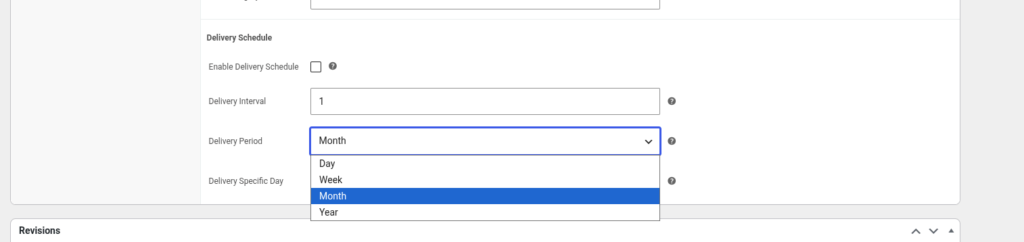
- Day
- Week
- Month
- Year
Delivery Specific Day #
Specify the exact delivery day when applicable.
Examples:
- Every Monday
- 15th of every month
This is useful for businesses that ship products on fixed schedules rather than immediately after payment.
Save Your Changes #
After configuring the advanced options:
- Review your subscription settings.
- Click Update or Publish.
- Test the subscription by placing an order to verify the renewal and delivery behavior works as expected.

