
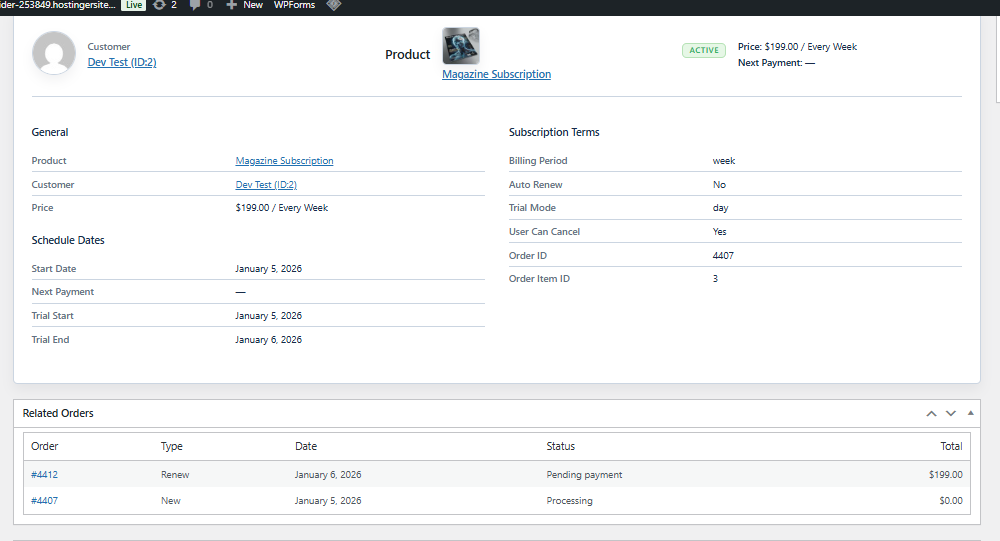
When an administrator clicks Edit from the Subscriptions list, the system opens the Subscription Details page.
This page provides complete visibility into the subscription, including customer data, billing terms, schedule, and related orders.
It is the main place for reviewing and managing an individual subscriber.
Header Information
At the top of the page you can instantly identify the subscription.
Customer
Shows the subscriber’s name with a link to the WordPress user profile.
Product
Displays the subscription product purchased.
Status Badge
Indicates the current state of the subscription (Active, Cancelled, Expired, etc.).
Price & Billing
Shows the recurring amount and billing interval (for example, $29.00 / every month).
Next Payment
The date when the next renewal charge is expected.
Schedule Dates
These dates control the lifecycle of the subscription
Start Date
The moment the subscription became active.
Next Payment
When the upcoming renewal order will be generated or charged.
Trial Start / Trial End
Visible when a trial period is configured. If not used, the value remains empty.


