
Flexi Subscription allows you to convert any WooCommerce product into a recurring purchase. Follow the steps below to create and configure your subscription plan.
WooCommerce → Subscriptions
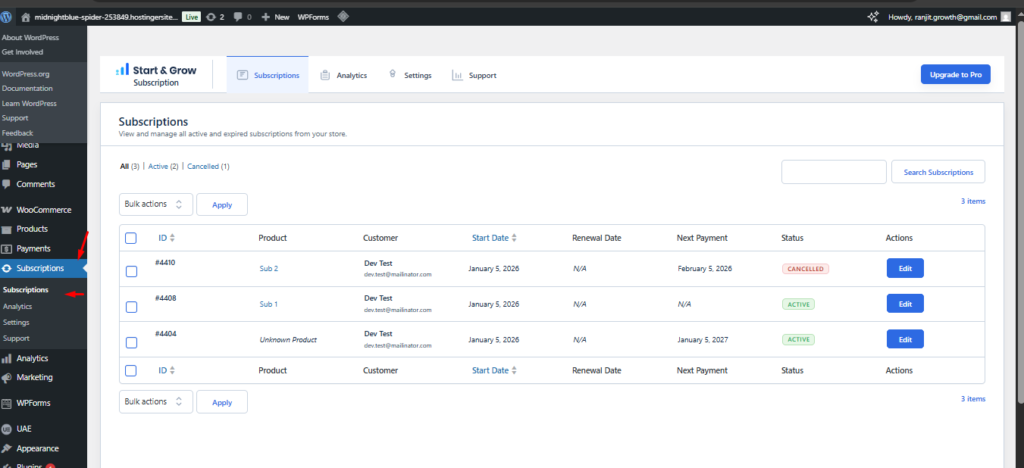
Subscriptions Tab
The Subscriptions tab is the control center for all recurring orders in your store. It provides a structured overview of every subscription, allowing administrators to monitor activity, check upcoming payments, and manage customer plans from one place.
What you can view in the table
Each row represents a subscription and displays the most important data:
• ID – Unique subscription number
• Product – The item or plan purchased
• Customer – Subscriber name and email
• Start Date – When the subscription began
• Renewal Date – Scheduled renewal cycle (if applicable)
• Next Payment – Date of the upcoming charge
• Status – Active, Cancelled, Expired, etc.
• Actions – Quick access to edit the subscription
Bulk Actions
Use the checkboxes to select multiple subscriptions and apply actions at once. This helps manage large volumes of recurring orders quickly..
Editing subscriptions
Click Edit to open the detailed subscription view. From there, administrators can inspect billing data, products, renewals, and perform manual updates when necessary.This tab ensures complete visibility and simple day-to-day subscription management.
Analytics Tab
The Analytics tab provides insights into your subscription performance and recurring revenue.
What you get in Pro
• Revenue tracking
• Active vs cancelled subscriptions
• Renewal trends
• Customer lifecycle insights
• Exportable reports for deeper analysis
Analytics help you make informed decisions and optimize your subscription strategy with real data.
Analytics Tab
The Settings tab allows administrators to configure how subscriptions behave across the store. These options control user roles, notifications, and essential system behavior.
Customer Role Settings
Define how WordPress roles change during the subscription lifecycle.
• Subscriber Default Role – Role assigned when a subscription becomes active
• Subscriber Inactive Role – Role applied when a subscription expires or is cancelled
Notifications
Control expiry reminders for your customers.
• Notify Before Expiry – Enable or disable reminders
• Reminder Days Before Expiry – Number of days in advance the email will be sent
Advanced Settings
Core operational options designed to keep subscription management clean and predictable.
These settings help you automate routine processes while keeping full control over how customers interact with their plans.
Always remember to click Save Changes after updating options.
Support & Overview
Welcome to the Support section.
Here you can learn what Flexi Subscription can do, discover premium capabilities, and find help when you need it.
Overview
Flexi Subscription helps you sell products and services on a recurring basis using WooCommerce. Whether you offer digital goods, physical items, memberships, or service plans, the plugin gives you powerful yet simple tools to run subscription businesses efficiently.
With a focus on flexibility and clarity, you can manage subscription behavior directly inside WooCommerce while maintaining full visibility of renewals and customer activity.
Core capabilities
• Create subscription products for Simple and Variable products
• Configure billing periods
• Apply one-time signup fees
• Allow early renewals
• Track subscriptions from the admin dashboard
• Monitor events and status changes
Premium Features
Upgrade to Pro to unlock advanced functionality such as:
• Variable subscription options
• Detailed subscription history
• Custom renewal periods
• Advanced pricing controls
• Enhanced automation and reporting
If you need technical assistance, documentation, or want to request new functionality, this tab is your starting point.


