
Razorpay Payments

Start accepting payments in minutes with 100% digital onboarding & feature-filled Razorpay payment gateway with the WooCommerce plugin.

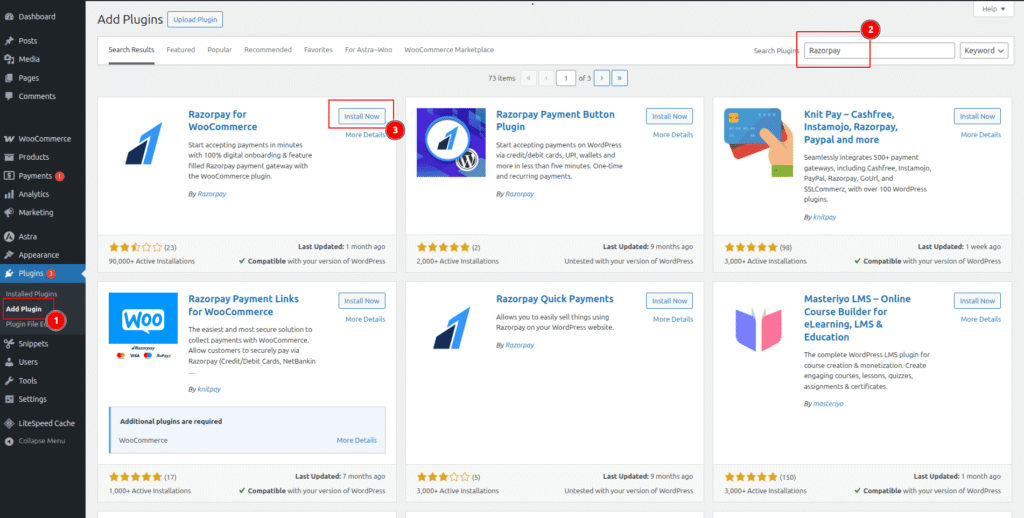
To process subscription payments with Razorpay, you will need to install the Razorpay for WooCommerce plugin. Follow the steps below to install and configure Razorpay for your WooCommerce site.

Install Razorpay #

  1. Log in to your WordPress admin.
  2. Go to your WordPress admin dashboard.
  3. Navigate to Plugins > Add New.
  4. In the search bar, type Razorpay for WooCommerce.
  5. Look for the plugin by Razorpay.
  6. Click Install Now, then Activate once the installation is complete.
Get Credentials from Razorpay #

  1. Go to Razorpay Dashboard.
  2. Go to Developers > API
  3. Click Generate API Key
  4. From the pop-up, copy Key ID and Key Secret. We will use these in WooCommerce settings.
  5. Flexi Webhook Secret Create the webhook and paste the webhook secret, it is compulsory.

Connect Razorpay to WooCommerce #

  1. In the WordPress admin menu, go to WooCommerce > Settings > Payments.
  2. Click Enable/Complete Setup in the Razorpay gateway.
  3. Check Enable/Disable.
  4. In the Key ID field, paste the Key ID copied from the Razorpay Dashboard.
  5. In the Key Secret field, paste the Key Secret copied from the Razorpay Dashboard.
  6. Click the Save changes button.

Was it helpful ?

Ready to Build Predictable Recurring Revenue?

Join thousands of store owners who trust Flexi Subscription for their subscription business.

Get Support

Got a question or need some advice? No problem. Just send us an email at support@flexisubscription.co and we’ll reply as soon as possible. You can also explore our documentation and knowledge base for step-by-step guides and helpful resources.

© Flexisubscription All right reserved

Explore

Documentation

Browse guides, tutorials, and documentation.

Free vs Pro

Compare Free and Pro features side by side.

Blog

Discover tips, updates, and helpful articles.

Discover documentation, feature comparisons, guides, tutorials, and product updates to help you get the most from Flexi Subscription.

Connect

Reviews

Read customer reviews and success stories.

FAQ's

Browse answers to frequently asked questions.

Use Cases

Explore real-world subscription use cases.

Downloads

Access plugin files, changelogs, and resources.

Membership Websites

Recurring memberships made simple.

Maintenance Services

Automate service plan renewals.

Subscription Boxes

Recurring deliveries with ease.

Online Courses

Subscription-based course access.

Digital Downloads

Sell downloads on recurring plans.

Reserve Your Lifetime License

@ Pre-Launch Price🚀

Secure lifetime access at a special pre-launch price before the official release.

Pre-order form
Download Free Plugin
