
The Settings page allows administrators to configure subscription behavior, customer roles, notifications, automation, API access, analytics, and integration options. These settings control how subscriptions are processed, renewed, managed, and integrated with external services.
Navigate to:
WordPress Dashboard → Flexi Subscription → Settings
Renewal Settings #
Configure how subscription renewals are processed.
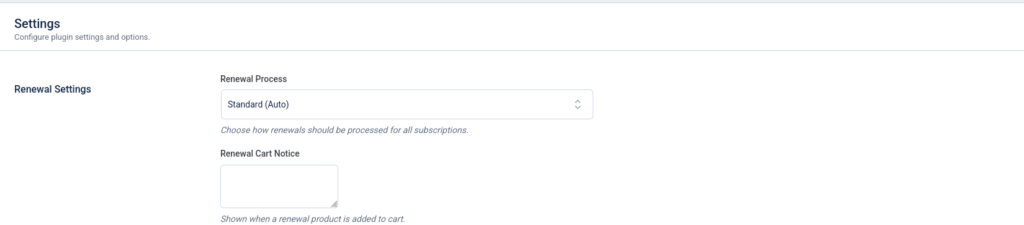
Renewal Process #
Select the renewal processing method for all subscriptions.
Available option:
- Standard (Auto) – Automatically processes subscription renewals using the configured payment gateway.
- Renewal Cart Notice
Enter a custom message displayed when a renewal product is added to the WooCommerce cart.
This can be used to:
- Inform customers about renewal purchases.
- Display renewal-specific instructions.
- Provide important billing information.
Customer Role Settings #
Automatically assign WordPress user roles based on subscription status.
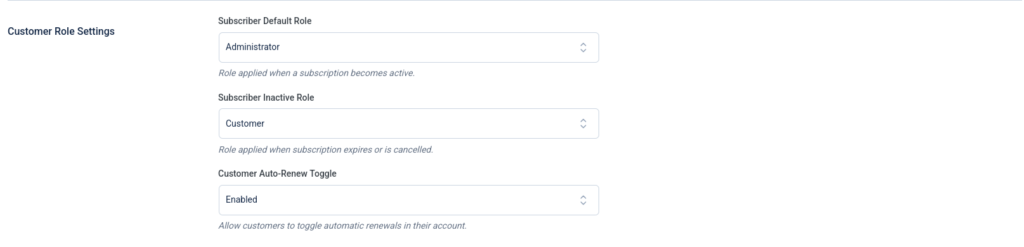
Subscriber Default Role #
Select the role assigned when a subscription becomes active.
Examples include:
- Customer
- Subscriber
- Member
- Custom membership roles
Subscriber Inactive Role #
Select the role assigned when a subscription expires or is cancelled.
This feature is useful for membership websites and restricted content.
Customer Auto-Renew Toggle #
Allow customers to enable or disable automatic renewals from their account page.
When enabled, customers can manage recurring billing without administrator assistance.
Notification Settings #
Configure automated reminder notifications.

Notify Before Expiry #
Enable or disable subscription expiry reminders.
Reminder Days Before Expiry #
Specify how many days before subscription expiry reminder emails should be sent.
This helps notify customers before their subscription ends.
Advanced Settings #
Configure advanced subscription management options.
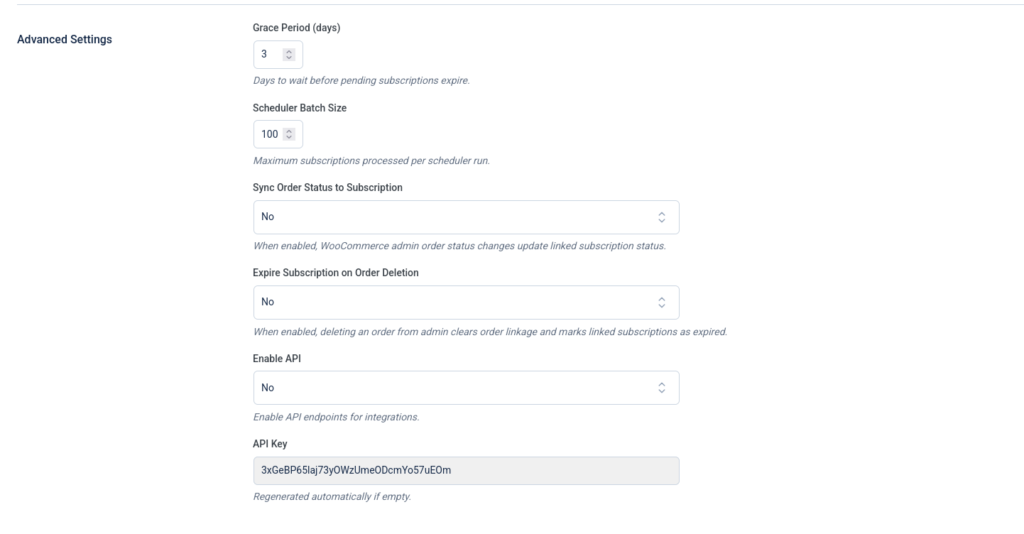
Grace Period #
Specify the number of days a pending subscription remains valid before expiring.
Scheduler Batch Size #
Set the maximum number of subscriptions processed during each scheduled task.
Higher values process more subscriptions per run but may increase server load.
Sync Order Status to Subscription #
Automatically update subscription status when the linked WooCommerce order status changes.
Expire Subscription on Order Deletion #
Automatically expire linked subscriptions if the associated WooCommerce order is deleted.
Enable API #
Enable REST API endpoints for subscription integrations.
When enabled, external applications can communicate with Flexi Subscription through supported API endpoints.
API Key #
Displays the generated API key used for authenticating API requests.
A Regenerate API Key option is available to create a new authentication key when required.
Automation, Analytics & Integrations #
Configure automation features, webhook delivery, analytics, and external integrations.
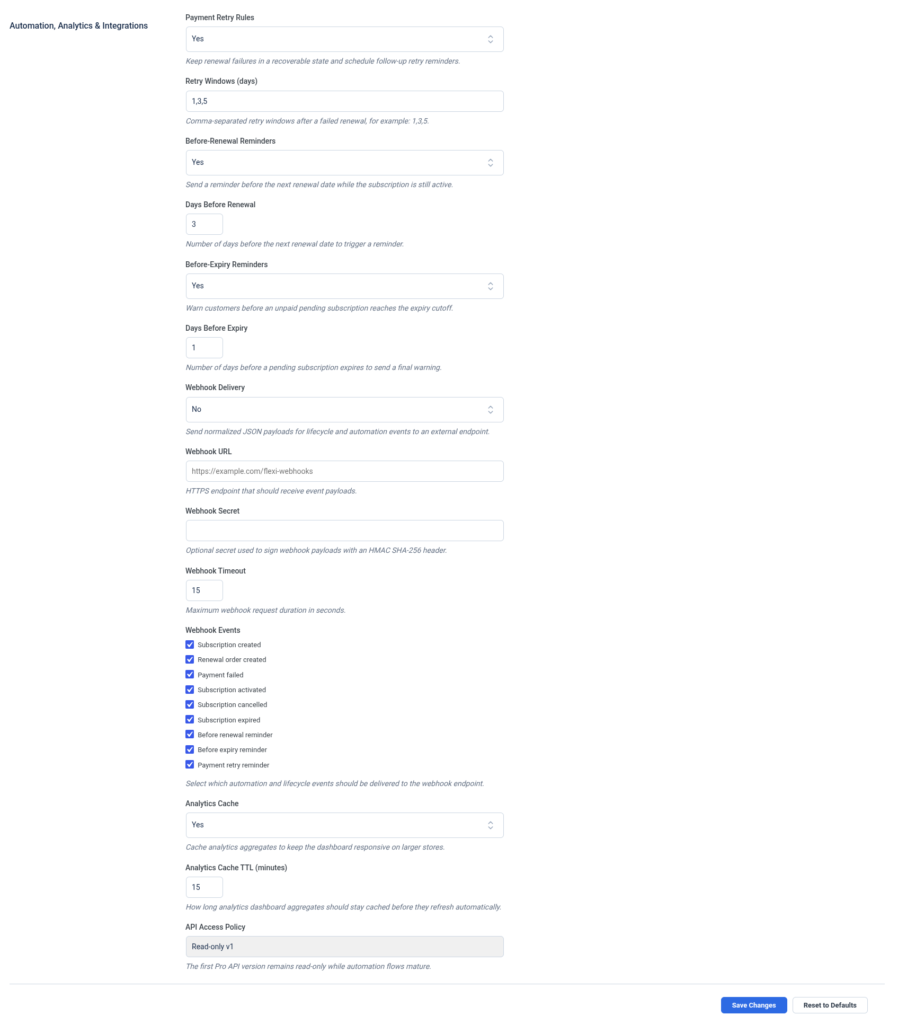
Payment Retry Rules #
Enable automatic retry attempts for failed renewal payments.
Retry Windows #
Specify retry intervals using comma-separated values.
Example:
1,3,5
The example above retries failed payments after:
- 1 day
- 3 days
- 5 days
Before Renewal Reminders #
Enable reminder notifications before scheduled renewal dates.
Days Before Renewal #
Specify the number of days before renewal when reminder emails are sent.
Before Expiry Reminders #
Enable reminder emails before pending subscriptions expire.
Days Before Expiry #
Configure the number of days before expiry to send the final reminder.
Webhook Configuration #
Configure outgoing webhook notifications for external applications.
Webhook Delivery #
Enable or disable webhook event delivery.
Webhook URL #
Enter the destination endpoint that will receive webhook payloads.
Example:
https://example.com/flexi/webhook
Webhook Secret #
Specify an optional secret used to sign webhook payloads using an HMAC SHA-256 signature.
This allows external systems to verify webhook authenticity.
Webhook Timeout #
Set the maximum webhook request duration in seconds before timing out.
Webhook Events #
Select the subscription lifecycle events delivered through webhooks.
Supported events include:
- Subscription Created
- Renewal Order Created
- Payment Failed
- Subscription Activated
- Subscription Cancelled
- Subscription Expired
- Before Renewal Reminder
- Before Expiry Reminder
- Payment Retry Reminder
Only the selected events are delivered to the configured webhook endpoint.
Analytics Settings #
Configure analytics performance and cache behavior.
Analytics Cache #
Enable or disable analytics caching.
Caching improves dashboard performance by reducing repeated database queries.
Analytics Cache TTL #
Specify how long analytics data remains cached before being refreshed automatically.
The value is entered in minutes.
API Access Policy #
Configure the API permission level.
Example option:
- Read-only v1
This setting restricts API access to read-only operations, making it suitable for reporting and external dashboards.
Save or Reset Configuration #
The bottom of the Settings page provides two actions:
- Save Changes – Apply and store the current configuration.
- Reset to Defaults – Restore all settings to their default values.
Settings Overview #
| Section | Purpose |
|---|---|
| Renewal Settings | Configure automatic renewal processing and renewal notices. |
| Customer Role Settings | Assign user roles and manage auto-renew options. |
| Notification Settings | Configure expiry reminder emails. |
| Advanced Settings | Manage scheduler, grace period, API, and subscription synchronization. |
| Automation, Analytics & Integrations | Configure payment retries, reminders, webhooks, and analytics. |
| Webhook Configuration | Send subscription lifecycle events to external systems. |
| Analytics Settings | Improve reporting performance through caching. |
| API Access Policy | Define permissions for REST API access. |
| Save Changes | Save configuration updates. |
| Reset to Defaults | Restore default plugin settings. |

