
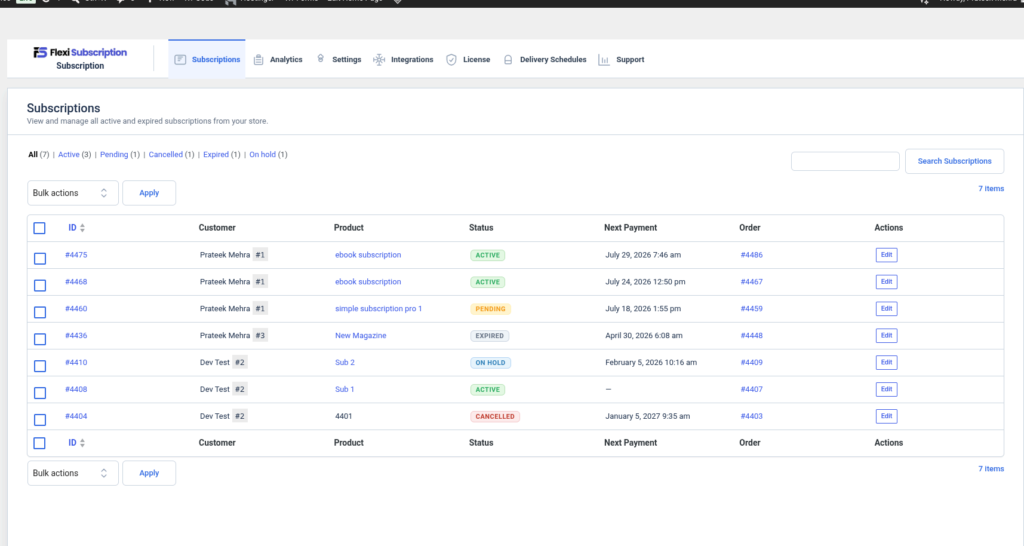
The Subscription Dashboard provides administrators with a centralized interface to manage subscription lifecycle events, monitor customer subscriptions, and perform administrative actions. It offers quick access to subscription records, status filters, bulk management tools, and detailed subscription information, making day-to-day subscription administration efficient.
Subscription List #
Navigate to:
WordPress Dashboard → Flexi Subscription → Subscriptions
The subscription list displays every subscription created in the store.
Each subscription record includes:
- Subscription ID
- Customer
- Subscription Product
- Current Status
- Next Payment Date
- Linked WooCommerce Order
- Available Actions
Administrators can quickly review subscription information without opening individual records.
Subscription Status Filters #
Subscriptions can be filtered by their current lifecycle status.
Available filters include:
- All
- Active
- Pending
- On Hold
- Cancelled
- Expired
These filters help administrators locate subscriptions based on their current state.
Search Subscriptions #
Use the search box to locate subscriptions by:
- Subscription ID
- Customer
- Product
Searching simplifies management when working with a large number of subscriptions.
Bulk Actions #
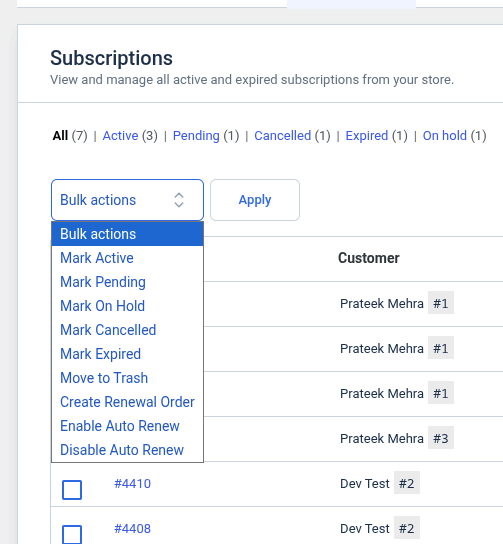
Select one or more subscriptions using the checkboxes to perform bulk operations.
Available actions include:
- Mark Active
- Mark Pending
- Mark On Hold
- Mark Cancelled
- Mark Expired
- Move to Trash
- Create Renewal Order
- Enable Auto Renew
- Disable Auto Renew
Bulk actions reduce administrative effort when updating multiple subscriptions simultaneously.
Edit Subscription #
Click Edit to open the subscription details page.
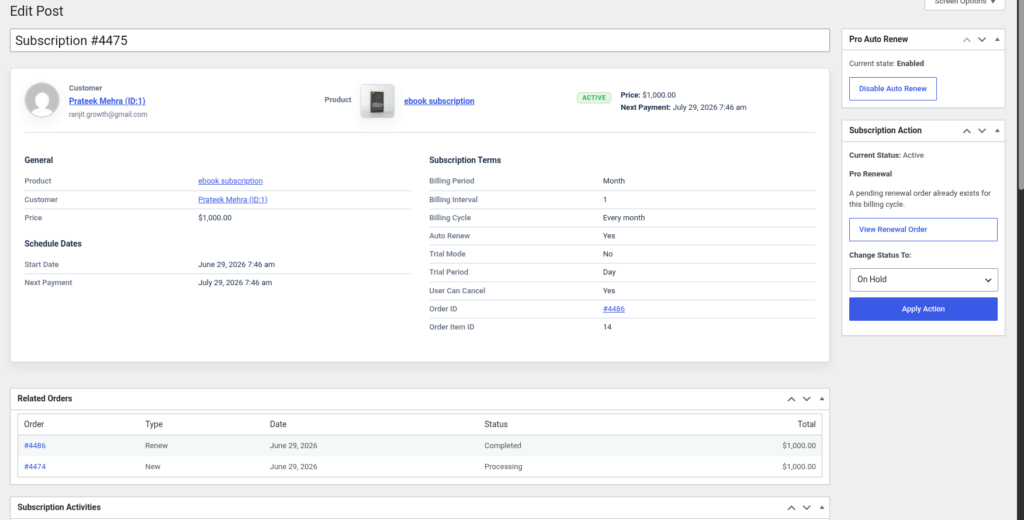
The subscription overview displays:
- Customer information
- Product details
- Subscription status
- Subscription price
- Next payment date
- Auto-renew status
This page serves as the primary management interface for an individual subscription.
General Information #
The General section displays basic subscription details, including:
- Product
- Customer
- Subscription Price
This information identifies the subscription and its associated customer.
Schedule Dates #
The Schedule Dates section contains important subscription dates, including:
- Start Date
- Next Payment Date
These dates help administrators monitor upcoming renewals and subscription timelines.
Subscription Terms #
The Subscription Terms section provides detailed billing information, including:
- Billing Period
- Billing Interval
- Billing Cycle
- Auto Renew Status
- Trial Mode
- Trial Period
- Customer Cancellation Permission
- Order ID
- Order Item ID
This section provides a complete overview of how the subscription is configured.
Subscription Actions #
The Subscription Action panel allows administrators to manage the subscription without editing its configuration.
Available actions include:
- View Renewal Order
- Change Subscription Status
- Apply Status Changes
Supported status changes include:
- Active
- Pending
- On Hold
- Cancelled
- Expired
These controls simplify subscription lifecycle management.
Auto Renew Management #
Administrators can manage automatic renewals directly from the subscription page.
Available options include:
- Enable Auto Renew
- Disable Auto Renew
The current auto-renew state is displayed, making it easy to verify whether future renewal payments will be processed automatically.
Related Orders #
The Related Orders section lists every WooCommerce order associated with the subscription.
Displayed information includes:
- Order Number
- Order Type
- Order Date
- Order Status
- Order Total
This allows administrators to review the complete payment history for a subscription.
Subscription Activities #
The Subscription Activities section records the subscription lifecycle.
Typical events include:
- Subscription created
- Status changes
- Renewal orders
- Payment events
- Administrative actions
- Auto-renew updates
The activity log provides an audit trail that helps administrators track changes and troubleshoot subscription issues.

