
Renewal Settings
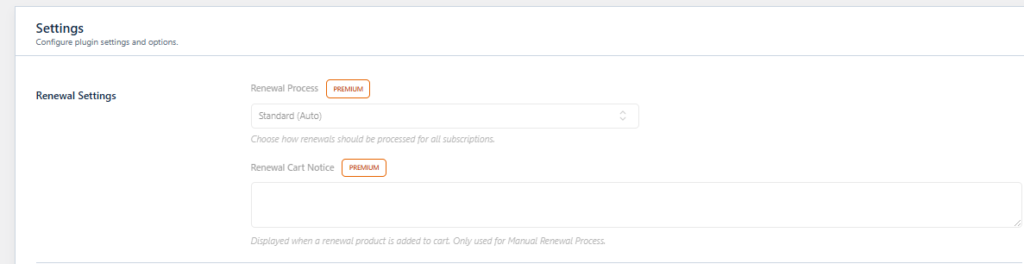
This section defines how renewal orders are handled. Available in premium
Customer Role Settings

Automatically assign WordPress user roles based on subscription status.
Subscriber Default Role #
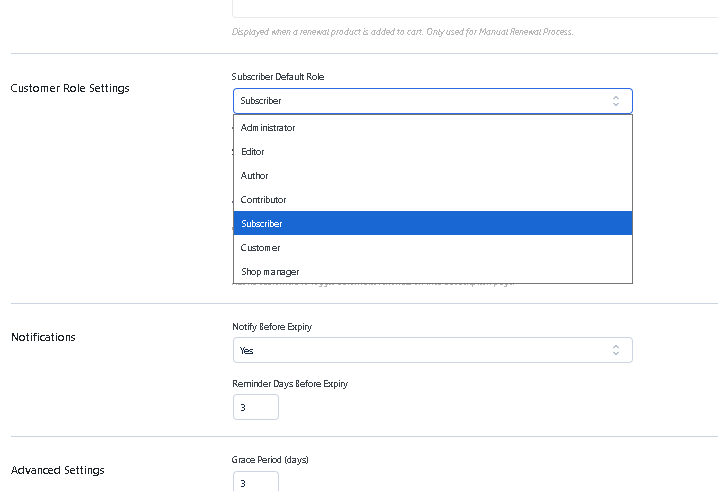
The role a customer receives when a subscription becomes active.
Example: Subscriber, Member, VIP.
Administrator #
- Full website control
- Can manage plugins, users, settings, and content
- Not recommended for customers
Editor #
- Can publish and manage posts and pages
- Cannot change core site settings
- Rarely used for subscriptions
Author #
- Can create and publish their own posts
- Cannot manage other users
- Suitable for contributor-based platforms
Contributor #
- Can write posts but cannot publish them
- Requires approval from an Editor/Admin
- Useful for content membership sites
Subscriber #
- Basic WordPress role
- Can log in and manage profile only
- Most common role for subscription customers
Customer #
- WooCommerce-specific role
- Can view orders and manage account details
- Recommended for ecommerce subscriptions
Shop Manager #
- Can manage WooCommerce products and orders
- Cannot change core WordPress settings
- Not suitable for regular subscribers
Subscriber Inactive Role


